How to Flash Using QFIL

You may often hear the QFIL application for flash, but do you know what QFIL is? QFIL stands for Qualcomm Flash Image Loader is a small application that can help in Flashing the Stock Rom firmware on Qualcomm smartphone and tablet smartphones. This guide is right for those of you who don't know how to flash using QFIL.
Especially for Qualcomm Chips smartphones there are many types of cellphones that we can flash through the QFIL tool. That's because various problems that commonly occur on Android with Qualcomm Chips machines such as bootloop, cellphone hangs, failed rooting, application forse close, and others.
that we can repair the software damage by updating the firmware flashing. If physical or hardware damage such as broken LCD, broken hardcase, just take it to the counter.
QFIL feature (Qualcomm Flash Image Loader)
1. Portable Application
You don't have to bother installing this application on a computer, just download it and then extract the application and run it. Very simple!
2. Easy to use
It was created for convenience, QFIL makes it easy for users to install firmware Qualcomm-based ROM ROM (.mbn) on mobile phones with just one click.
3. Log box
When you don't have time to see the flashing firmware process with QFIL, take it easy! Because you can see the complete log in the application log box that can be used to help with errors in the flash process.
4. Supports Qualcomm Chipset
Remember! indeed there are many features in this application, but QFIL only supports devices that use cipsets from Qualcomm only.
How to Flash Using QFIL
Let's go to the core of the discussion, the benefits of flash using QFIL can be to overcome the hp deadboot 9008 flash brick mode on the Qualcomm chipset android.
Materials to be prepared:
- Computer / laptop.
- QPST please download here.
- Drivers for Qualcomm can be downloaded here.
- Special firmware for each type of mobile. Lots of things on Google!
- Keep the battery above 50%.
If the material is all ready, please install QPST, which was already downloaded
Steps for how to flash with QFIL:
Open the QFIL application.
- C: \ Program Files \ Qualcomm \ QPST \ bin \ QFIL.exe (for 32Bit)
- C: \ Program Files (x86) \ Qualcomm \ QPST \ bin \ QFIL.exe (for 64Bit)
The QFIL display will look like this:
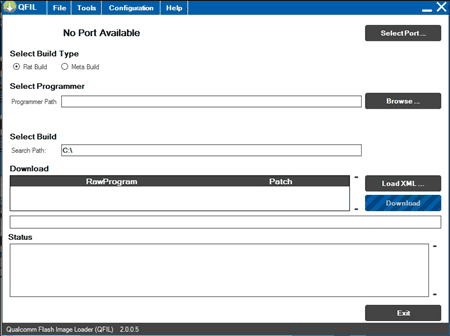
Select "Browse" and in "Patch Program" select firmware according to the type of each cellphone. And choose prog_emmc_firehose_xxxx (xxx means that is according to our mobile type)
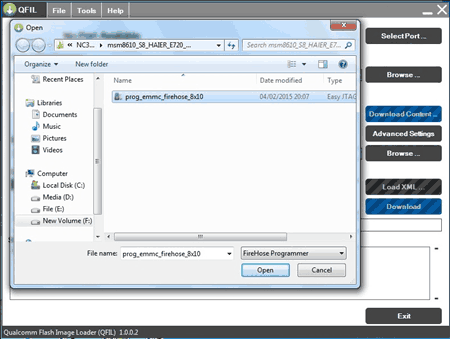
Then "Load XML" and select "rawpgormam0.xml" or "rawprogram_unspare.xml" depending on the firmware, then select "patch0.xml"
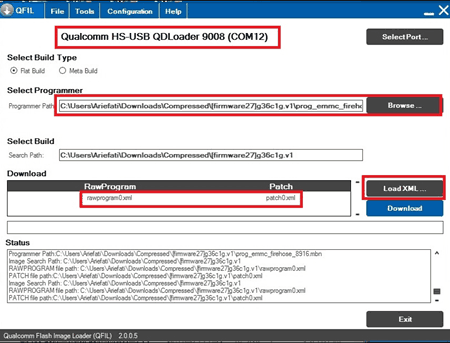
The next step is to connect the cellphone in 9008 mode and must be detected by QFIL.
Are you Asus Zenfone 5 and having a problem? try reading how to flash Asus Zenfone 5
If 9008 IDs of QFIL had not been detected, try to check the drivers in the device manager. If there is an exclamation point, that means the driver is not installed, how? repeat again.
Finally, click download on the QFIL application and wait until the flash process using qfil is complete. And if there are any unexpected questions or problems, please say in the comments below.