How to Disable Instagram

If we have too many Instagram accounts and want to reduce them. So how to disable Instagram account is the right choice. Or maybe you are bored with activities in cyberspace.
We can disable Instagram permanently or only temporarily. You just want to stay forever or not.
In fact, with the many features that Instagram has, this application makes it difficult for users to leave.
But not a few of the instagram users who may feel bored or saturated with life in this virtual world.
Can't login to Instagram? see how to overcome it can't login Instagram.
So they try to choose to pause for a while, or even delete the IG account permanently.
Beginners may not know how to disable the Instagram account.
Because the option to permanently disable and delete Instagram accounts is not available on the Android or iPhone applications.
Before we listen to the steps. It would be nice to read some questions that are often asked when you want to deactivate / delete an Instagram account.
Contents [hide]
- 1. Frequently Asked Questions
- 2. Ways to Deactivate a Temporary Instagram Account
- 3. Reactivating the Instagram Account that is Disabled
- 4. Ways to Permanently Delete an Instagram Account
By conducting various researches in various community forums. We often find some questions related to disabling or deleting Instagram accounts.
Here are four most questions:
Is our account data missing if disabled?
This is the most question we have encountered. The answer is that all the data on our account, such as posting photos, videos, highlight stories, likes and comments, will not disappear. But it will only be hidden.
This includes profile settings, number of followers and following, and various other data.
When we activate our Instagram account again. All data will return to normal.
But if we choose to permanently delete the Instagram account, all data will be lost. Which means if we want to be active again in the world of instagram we have to start again from scratch
Why is the password always wrong when verifying deactivation?
The second question is about the password error when verifying. This usually happens because we forget our last password.
‘Maybe a few months ago we changed it but we forgot.
Can it disable IG via the application?
As we discussed above. Lots of users don't find an option to deactivate or delete accounts through the application. The answer can't. Because Instagram itself does not provide this option in the application. We can only deactivate and delete the IG account via the Instagram.com website.
Can it disable IG using a computer?
This question may be frequently asked by users of computers or laptops. The answer can be.
Because the Instagram.com site is not only accessible via mobile phones. But we can also access it using other devices such as computers, laptops, tablets, and the like.
Then what is the same way? Yes, the steps are exactly the same whether we open it via a smartphone or computer.
Now that's a few questions that often appear when disabling the Instagram account. After we read some of these questions or even the question also crossed our minds.
Now we know the answer. Now it's time for us to go to how to easily disable Instagram accounts
How to Deactivate a Temporary Instagram Account
This one option is perfect for those of us who just want to just rest from Instagram.
Because by using this method, someday we can reactivate our Instagram account without having to lose the existing data on the account.
How to disable temporary instagram from cellphone:
- Open the browser on your cellphone or laptop.
- Visit the https://www.instagram.com/ site.
- Login with usename and the Instagram account password to be deactivated.
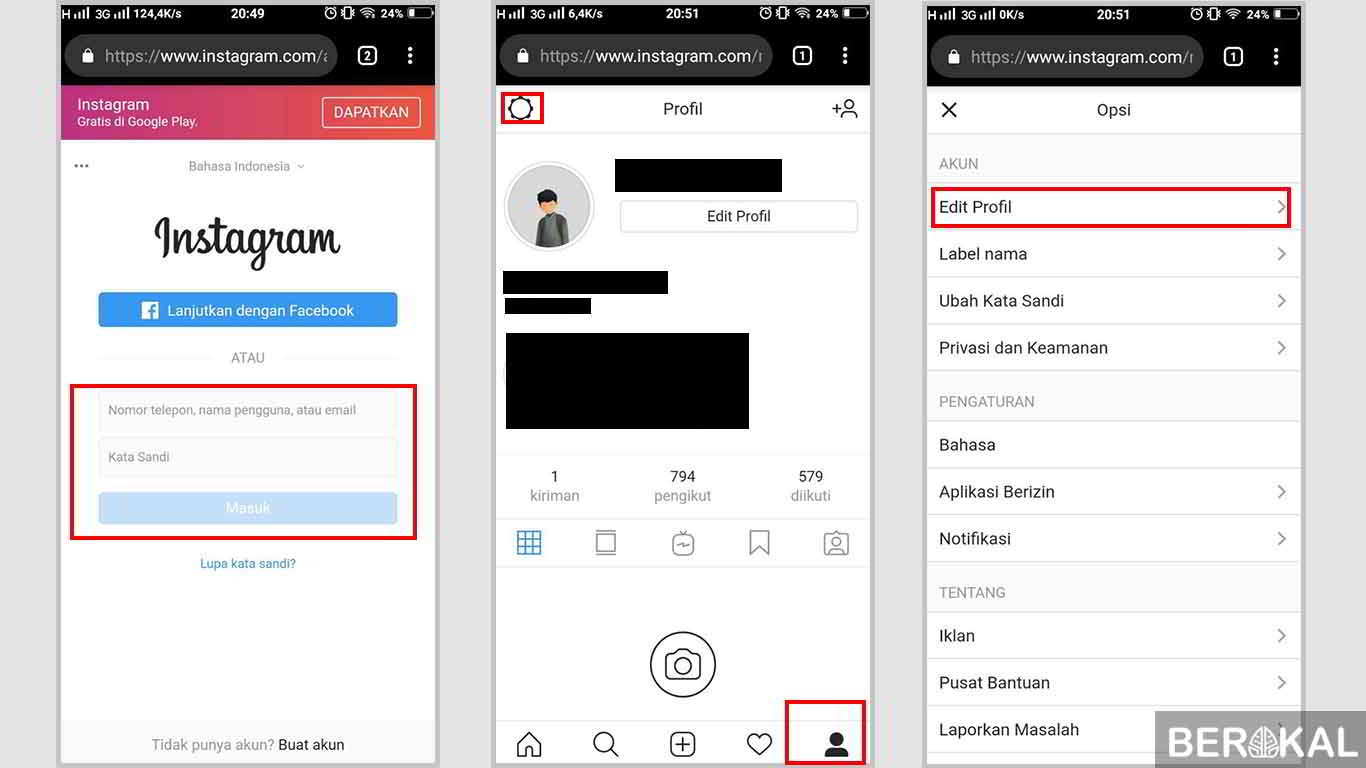
- After successfully entering. Go to the profile menu by pressing the profile icon at the bottom right.
- If you have entered the account profile menu. Tap the gear icon in the top left corner. Then click Edit Profile.
- In the edit profile menu scroll down until we find the article Disable temporarily my account / temporarily disable my account in blue. Press on the text.
- Wait until we go to the next page. After we are on the page. Choose the reason why we will temporarily deactivate our Instagram account. Next enter the Instagram account password. If you have clicked on the Temporarily deactivate my account button / Temporarily disable my account.

- A confirmation pop-up will appear if we temporarily disable our Instagram account. If yes, click Yes.
- If successful, our Instagram account will automatically exit. If we try to enter the account, there will be a red text as shown below.
Reactivating an Instagram Account that is Disabled
If at any time we want to reactivate our account that we previously deactivated, then refer to the following method.
Previously to reactivate the Instagram account. We need approximately one week from the day we turn it off
How to reactivate:
- Open the browser and then access Instagram.com
- Login using the account username and password
- If successful, the IG account will open. But if not, maybe the account has not been active for one week
How to Permanently Delete an Instagram Account
If we want to stop forever and delete all activities and also data that is on our instagram. The way this one is right. Because all data in our account will be completely deleted.
But in this way we cannot return the account that we deleted. If someday we want to be active again in the Instagram world we have to start again from scratch and create a new account.
How to permanently disable Instagram accounts:
- Run our browser. Both using a computer or cellphone.
- Go to the site https://www.instagram.com/accounts/remove/request/permanent/.
- Then log in using the Instagram account to be deleted.
- Here we will be faced with a Delete Your Account page / Delete Your Account.
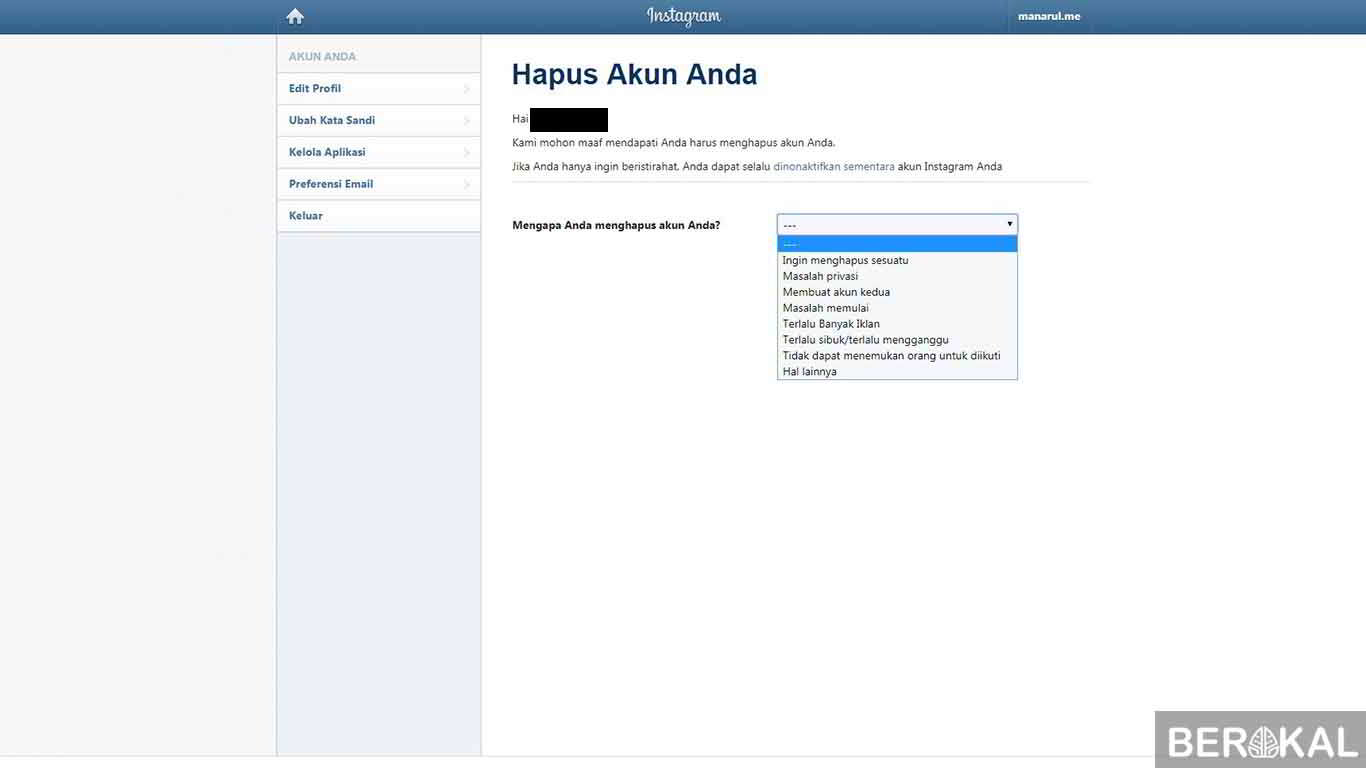
- Next we choose the reason why we will permanently delete our account. If you have already entered the Instagram account password ...
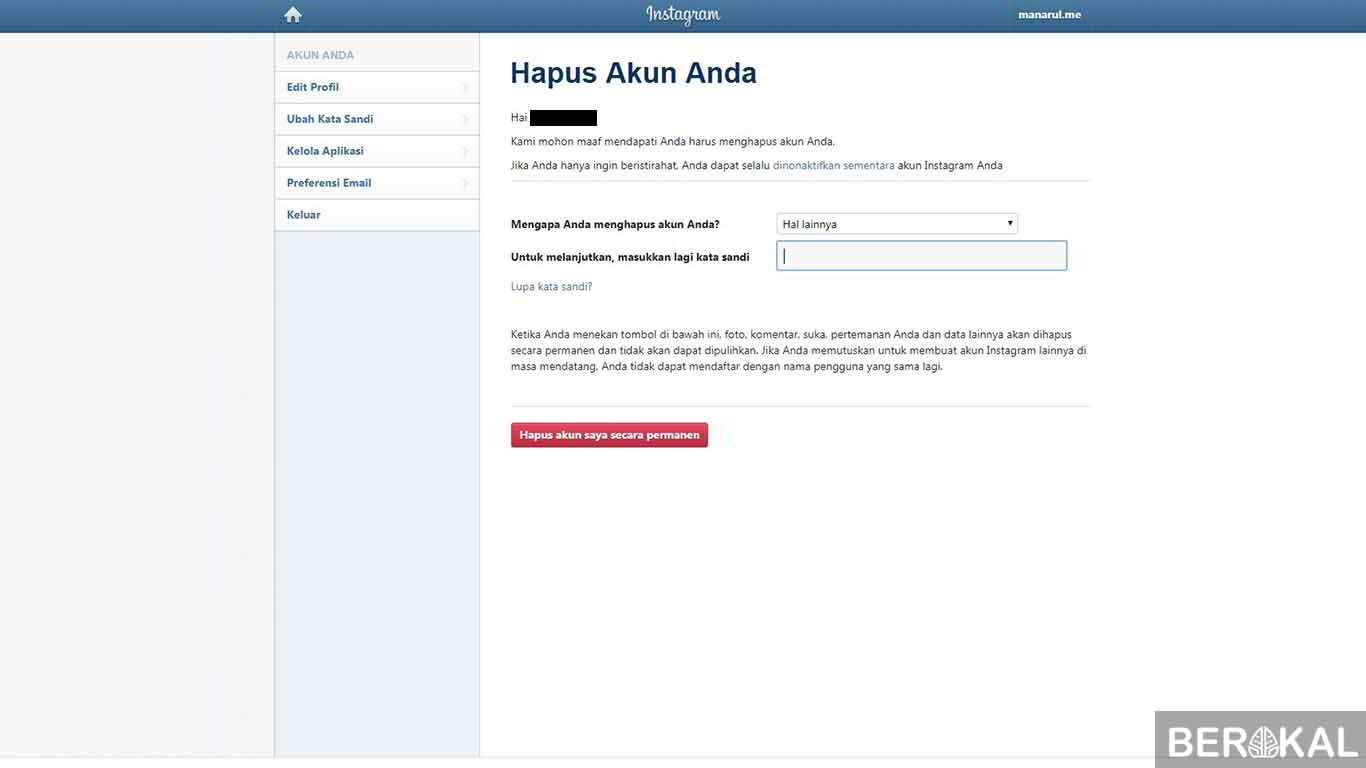
- After we choose the reason and also enter the password. Now click the red button that says Permanently delete my account / Permanently delete my account.
- If a confirmation appears click OK to delete our Instagram account. After that the display will appear as below. Which indicates that our account was successfully permanently deleted.
The above are two ways to disable temporary and permanent Instagram accounts. Preferably before you choose to delete your Instagram account permanently think about it carefully.
Or you can choose to temporarily disable the account.
And you need to know that the username that has been used on the permanently deleted account cannot be used again.