How to Change Android Fonts

Sometimes we get bored with the default display of Android, for we can make changes to the Android device so that it becomes cooler. One of them is by changing the android font. There are several ways to change android fonts that you can later apply.
We know that using an Android phone has a lot of advantages, you can change things on an Android smartphone that cannot be done by other types of smartphones. As long as you are a little creative and tenacious to do it.
We try not only the tutorial to change the Android font for the future, but there are other tutorials like changing themes so that they are cool, making Android lighter, and so on. Here are some ways that can be applied.
How to Change an Android Font without Root
Solution for those of you who want to change fonts but don't want to rooting android. The way is not as difficult as you imagine, you can change the font of Android in the way below.
1. Android settings
In some Android manufacturers, you will be provided with an android font that you can change at will. Depending on what Android phone manufacturer you are using, you will usually find this feature in the Settings menu. For example, for most models of Samsung phones in the form of TouchWiz.
To change the android font, you need to visit Settings, then Device and navigate to Fonts. After that, to change the android font, choose the Font Style menu. For some other manufacturers that provide android font replacement features, look for it in the Settings menu, and after that it usually goes to the device.
2. Use the Launcher Application
By using the launcher application, you can change your android font to your heart's content without the hassle of using methods that might be a little complicated.
You can download the best launcher as you wish, you can download the application launcher through Google Playstore.
How to change android font without root using Go Launcher EX, see the description below.
- Make sure you have downloaded the Go Launcher EX application.
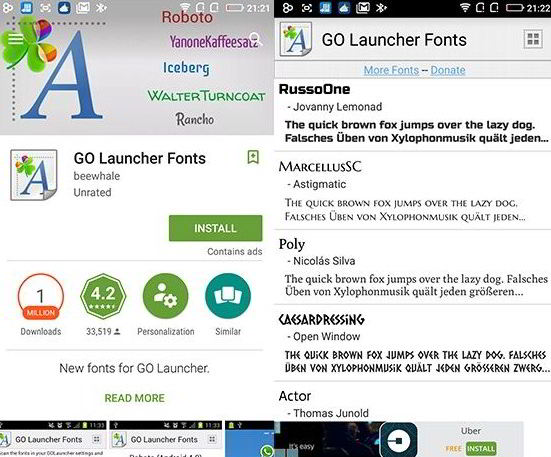
- After succeeding, download Go Launcher Fonts. Look for the font that you think is interesting, and download it. How to Change an Android Font without Root
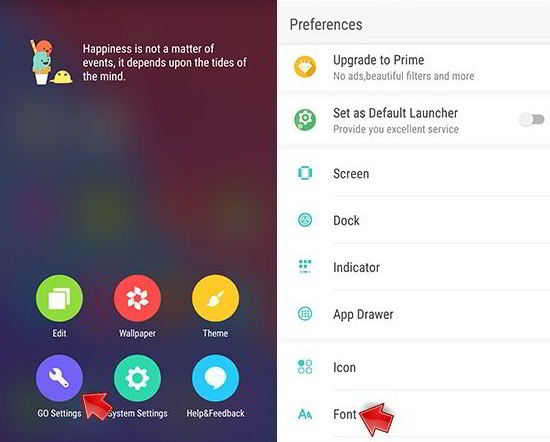
- After installing Go Launcher EX, press the blank area on the homescreen, then there will be a variety of options. you just select Go Settings, then click the Font option. how to change the android font
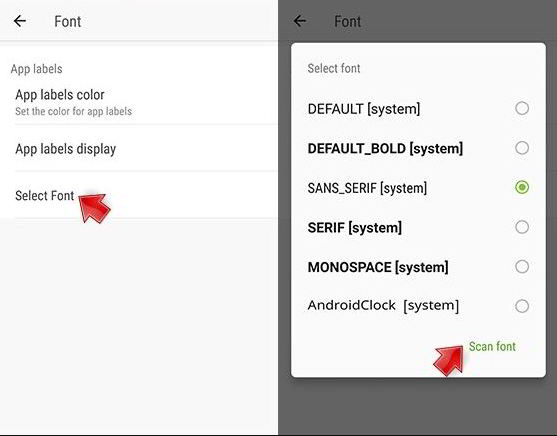
- Next, you select Select Font, and Scan Font, then choose which font you like.
Congratulations, you have successfully changed the font with the intermediary Go Launcher EX and Go Launcher Fonts. Choose the font that suits you.
3. Download Perappfonts
How to change android fonts that are different from previous methods. If you usually change the Android font as a whole, then with this application, you can change Android fonts one by one in each application.
So, for each application, you will get different Android font displays. Although it is only decorated with eight types of fonts, this unique application still needs to be tried.
4. Download the Font Installer
Font Installer is another application that is provided to change android fonts. This application will take you to choose hundreds of fonts that have been provided in the gallery. You can also customize your own font, and share it with your friends.
Of course this application will work on rooted phones, after that you will know the true quality of the Font Installer. This is the best alternative for those of you who want to change your Android font quickly.
5. Download the Hifont Application
Apart from using the Go Launcher EX application, you can download the Hifont application to change the default font of the Android smartphone. Then how do you use the application? The answer is below.
- Make sure you have downloaded the Hifont application.
- Open the Hifont application, then select the font according to your taste.
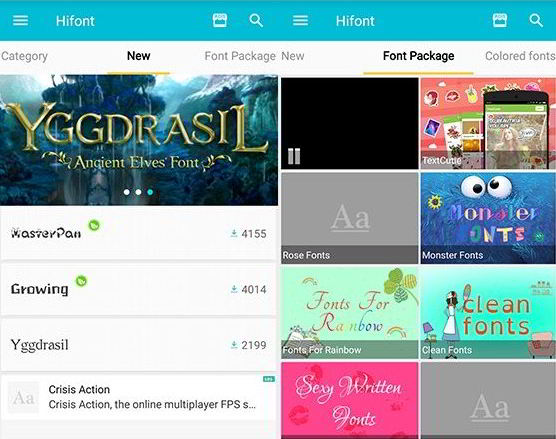
- After opening one of the fonts you have selected, click Download. Then, select Use after the download has been successful.
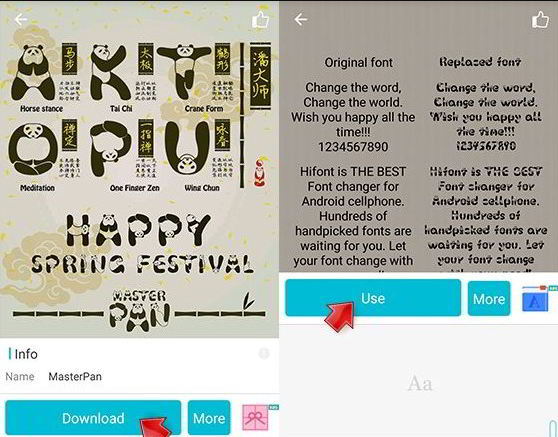
- Because Hifont is actually only for devices that have been rooted, then you will be directed to download Swift Launcher - Custom Font, then click install.
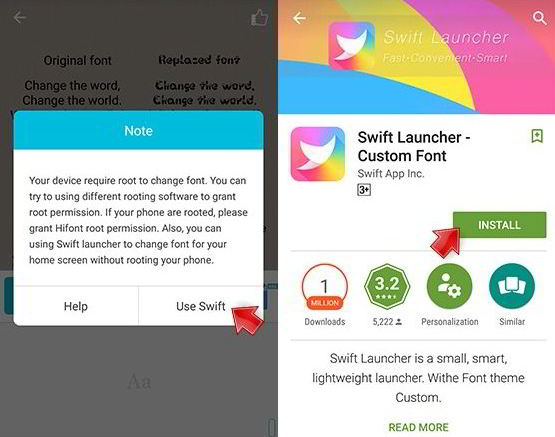
- After successfully installing, reopen the Hifont application then look for the font that you downloaded earlier. Go back to Use, then Change Swift Fonts, and finish.
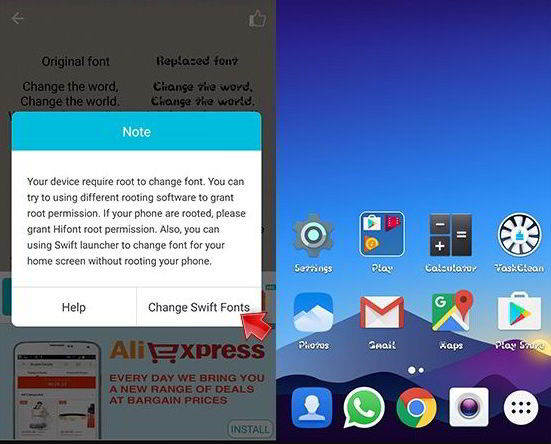
Now, you can replace your android font at will. Adjust to your needs and desires in changing the android font, and you will get an android display that is much different than before.